
Airline ticketing is not as simple as it may seem to passengers. It is a complex process that involves many systems, interactions, and regulations. This article aims to explain how ticketing works, what a ticket is, which accreditations an agency should have in order to issue tickets, and how to sell flight seats without having major certifications.
What is an airline ticket?
An airline ticket is a document granted by a carrier or travel agency to a passenger as a confirmation that a person has bought a seat on a flight. It can exist in two forms — paper and electronic (e-ticket). Today, you’ll most likely deal with a digital version, while hard copies are becoming museum artifacts.
No matter the form, the air ticket performs several important functions.
- It seals the deal between a passenger and an airline, establishing rights and responsibilities on both sides. The ticket documents whether and under what conditions a passenger can modify an itinerary, cancel a flight, or receive a refund.
- It serves as a travel document, ensuring that an airline will provide a seat and services included in the fare for the ticket owner. On the other hand, carriers use a document as a source of information about the passenger and the booking.
- It manages relationships between multiple airlines involved in one journey (if this is the case). To be more precise, it outlines the responsibilities of the validating carrier which issued the ticket and the operating carrier or carriers that perform the flight.
Speaking of flights, conducted by several airlines, only one of them owns a ticket at any given moment. This possession makes the airline responsible for the passenger and updating their status (checked-in, boarded, flown, etc.)
Airline ticketing process
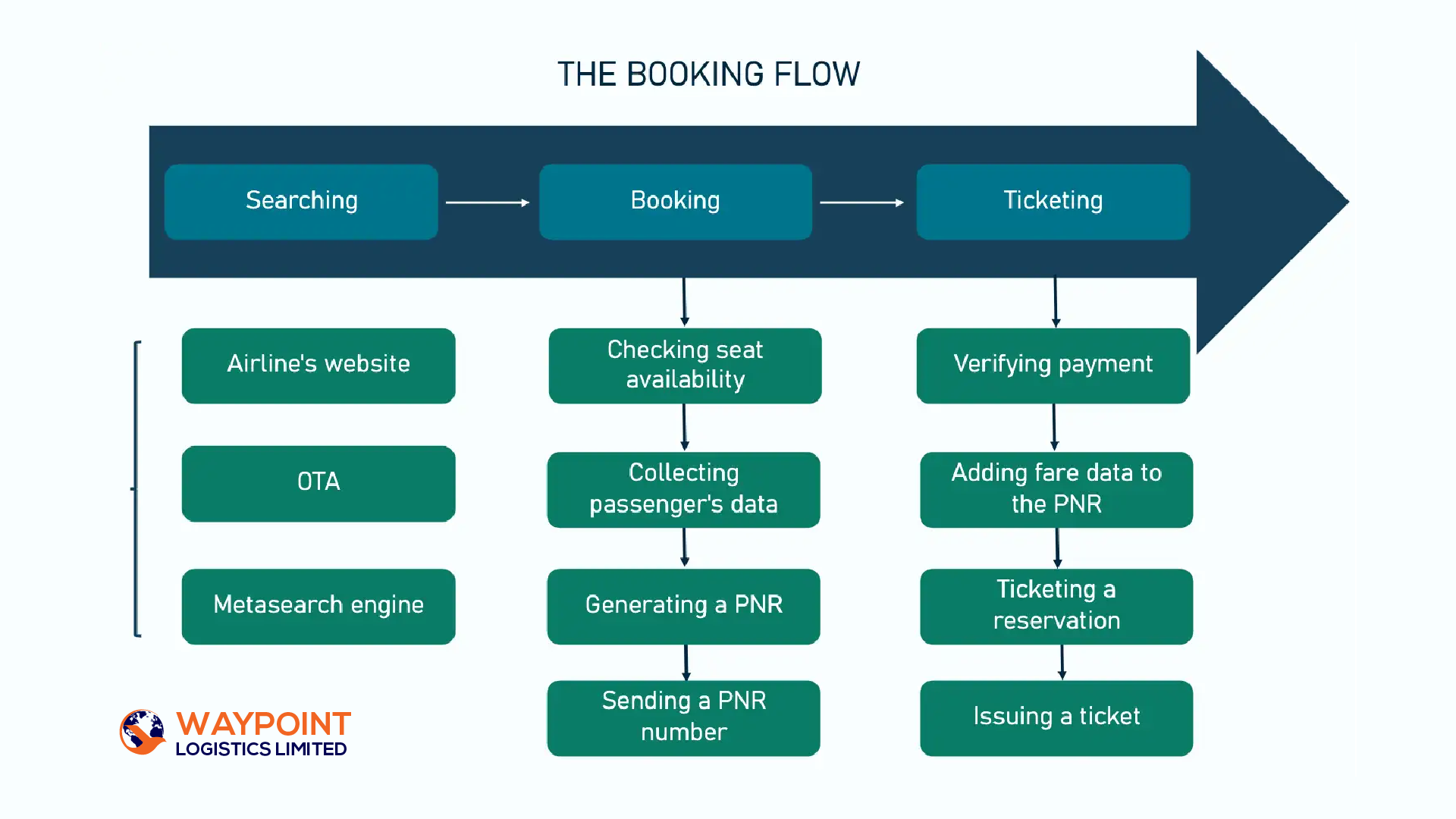
Airline ticketing is the final stage of the complex flight booking process. For a passenger who buys the flight via a website, it may seem like a single flow since everything goes so smoothly and fast. But in fact, there are three separate steps, each consisting of multiple procedures.

Flight search
The first step is the flight search that can happen on different platforms — airline web pages, online travel agencies, or metasearch engines.
Airline web pages. When a passenger searches for a flight on an airline’s website, the query is sent directly to the carrier’s central reservation system (CRS), without any third parties involved. The CRS returns the list of available options for required dates. Pretty straightforward! Yet, more often than not, the choice will be limited to flights of a particular airline and its partners.
Online Travel Agencies. If you want to compare offers from numerous airlines or plan a multi-leg itinerary, Online Travel Agencies (OTAs) are what you need. They source flight data from Global Distribution Systems (GDSs), air consolidators, and partner carriers. Most OTAs rely on a booking engine technology to prioritize results according to business rules and apply pricing markups before displaying airfare deals to end users.
Metasearch engines. Platforms like Google Flights or Skyscanner aggregate information from OTAs and airline CRSs to show the widest possible range of options, including those from low-cost carriers that typically don’t share their flights with GDSs (and consequently, with OTAs.) Yet, metasearch engines typically don’t support booking. Instead, they redirect a user to the airline website or OTA.
Flight booking
Step number two is booking. After a passenger selects a certain flight, the retailer — be it an airline website or OTA — checks with the CRS if the option is still available at the same price. Then it collects a traveler’s data to create a Passenger Name Record (PNR). This digital document contains essential information about the itinerary in question and is stored in the CRS.
Once a passenger has entered all mandatory details, the system generates a booking reference — a unique code that serves as an address of the PNR file in the CRS and confirms the reservation. Travelers receive such codes via email and can use them to track their flight status, change itinerary details, add ancillaries, or cancel the trip.
Ticketing
The PNR is not enough to enable ticketing. Travelers still have to seal the deal with money. For this purpose, both airlines and OTA employ payment gateways — third-party services that process electronic transactions and ensure data security. Today, in most cases, passengers pay for the flight immediately after they enter all booking info.
Why do air prices change so often and how is AI involved? Read about AI in airline revenue management on our blog.
Though the bank reserves the money on your credit card the moment you book a trip, it can take up to three days to verify payment details, confirm the transaction and check if the seat is still available (yes, one more time.) That’s why there is a lag between reservation (when you receive a PNR number) and actual ticketing.
After the payment is confirmed, an airline adds the corresponding fare information to the PNR document. This specific record serves as a basis for ticket issuing.
Eventually, a passenger receives the itinerary receipt via email. This document signifies the successful purchase of an e-ticket. You can print it out multiple times or download it to any device. The airline stores the e-ticket in its reservation system.
Note, though, that the receipt doesn’t allow you to board the plane. To take your seat on the flight, you have to check-in — online or at the airport — and receive a boarding pass (printed or electronic) generated by the airline’s departure control system.